Google Launches Generative AI Performance Reports in Search Console
Google Search Console now features a dedicated Generative AI performance report to track your site's visibility and impressions within AI Overviews and Discover.
SEOGEO Editorial
News Analysis

Today, Google made a monumental leap for Generative Engine Optimization (GEO) by announcing the launch of the new Search Generative AI performance reports in Search Console. This update includes dedicated reports for both Search and Discover, finally giving webmasters the concrete data needed to track and understand their site's visibility within generative AI features on Search.
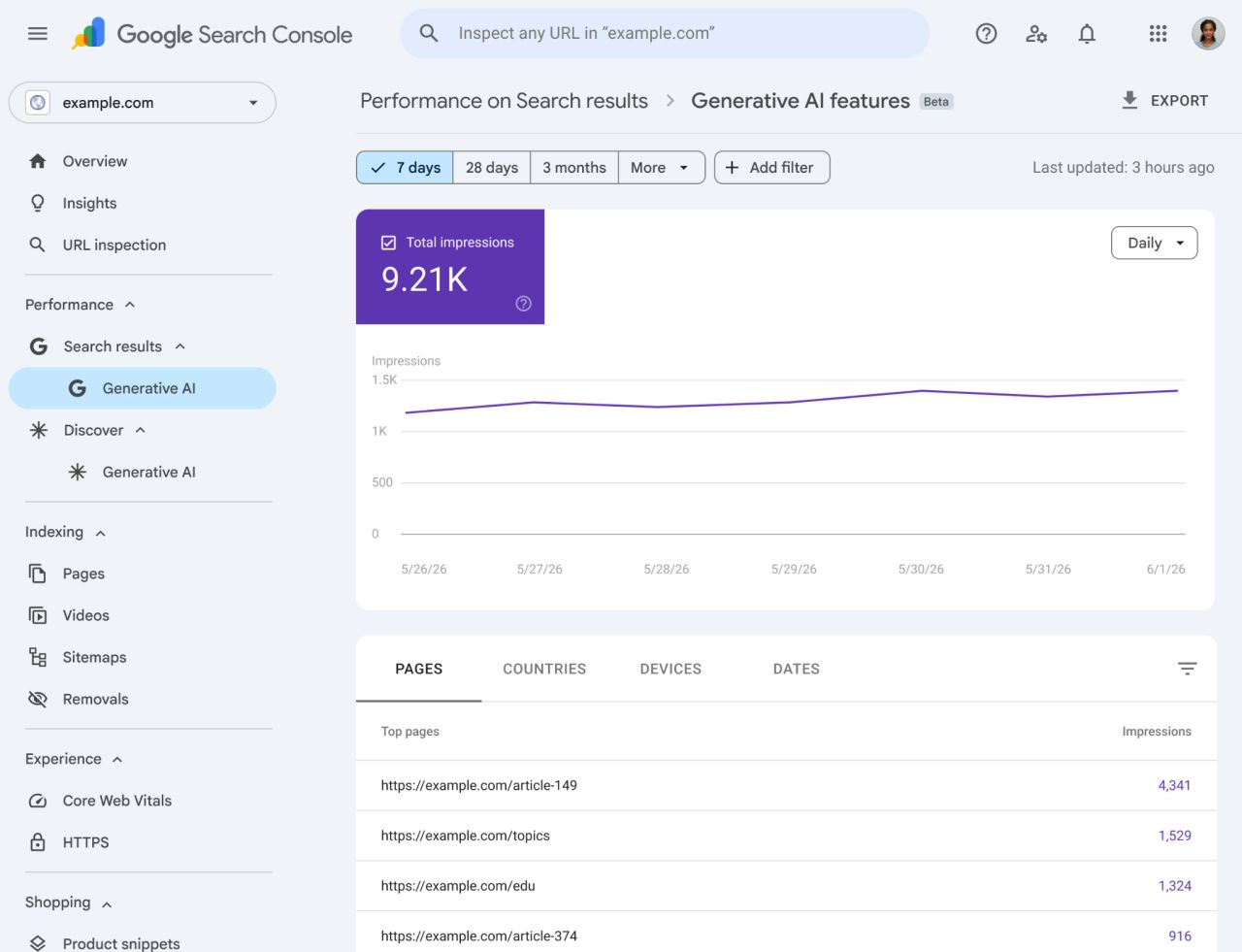
For months, tracking SGE impressions and AI search visibility required third-party workarounds. Now, the new Google Search Console AI performance reports are designed to give you dedicated, first-party views of your impressions within generative AI features—specifically AI Overviews and AI Mode, as well as AI features in Discover.
What's Changing in Search Console?
Previously, AI data was quietly blended into the overall performance report. While it will continue to be tracked there to give site owners a comprehensive overview of their overall search visibility, today's update launches a completely separate view dedicated strictly to generative AI.
According to Google Search Central's official statement: "We are rolling these reports out to a subset of websites, allowing us to thoroughly test them and receive feedback before making them widely available."
What Metrics Can You Track?
To help you understand how your pages are performing in the AI era, the new Google Search Console AI report provides highly actionable Answer Engine Optimization (AEO) insights. The report currently shows the following information:
- Impressions: How often URLs from your site appeared in generative AI features in Search and Discover.
- Pages: Check exactly which URLs are successfully appearing as citations within AI features.
- Countries: Understand your AI search visibility on a regional basis.
- Devices: Identify whether desktop or mobile users are triggering the AI Overviews that cite your website (available for Search results).
- Dates: Monitor your performance over time with hourly, daily, weekly, and monthly granularity to track algorithm shifts.
The Era of AI Overviews Tracking is Here
With native AI Overviews tracking now a reality, the guesswork in Generative Engine Optimization is coming to an end. By monitoring which pages earn citations and generate impressions, SEO professionals can reverse-engineer exactly what Google's Gemini models value. Armed with this data, you can confidently adjust your content structures and report accurately on your AI visibility successes.
Frequently Asked Questions
It is a dedicated report that allows site owners to track impressions and visibility specifically within Google's AI Overviews and other generative AI features in Search and Discover.
Yes, the data from generative AI features is still included in your overall performance report to provide a complete view of your site's visibility. The new tab simply offers a segmented, AI-only view.
If your site is part of the initial rollout, you can find the report in Google Search Console under the "Performance" section in the left-hand sidebar, labeled "Generative AI" beneath the standard Search results tab.
Tracking AI impressions helps professionals understand exactly which content Google's Gemini models prefer to cite. This allows marketers to reverse-engineer successful strategies and optimize their content specifically for Generative Engine Optimization (GEO).